
Download Llama 2 – Free, Open‑Source AI Chat Model for Windows, Mac, Linux, Android & iOS
Overview
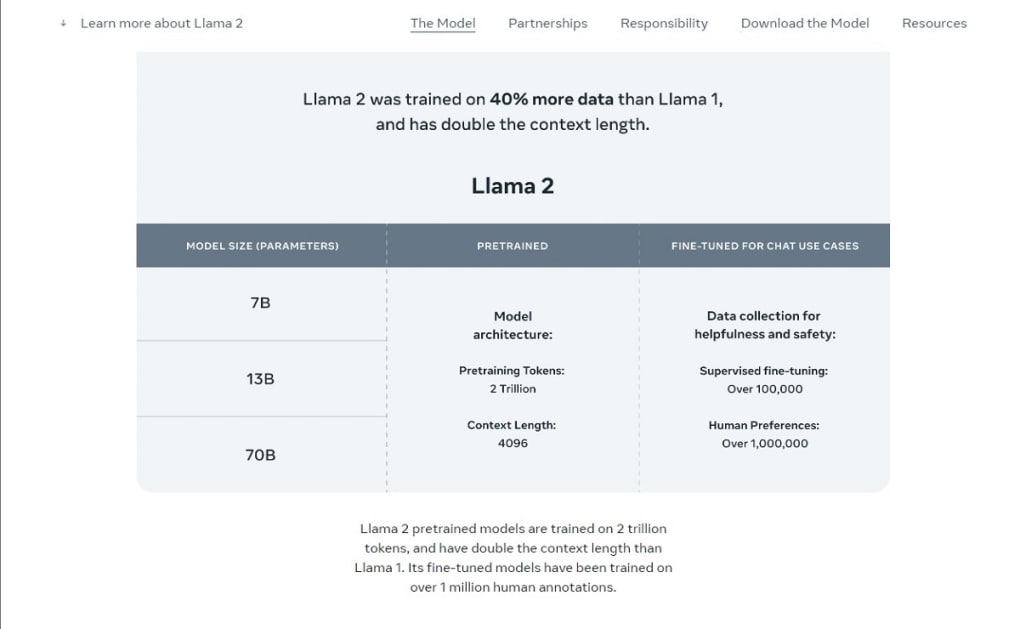
Llama 2 is Meta’s latest open‑source large language model (LLM) that brings cutting‑edge conversational AI to anyone who wants a free, secure, and highly adaptable tool. Built on 2 trillion tokens and trained on 40 percent more data than its predecessor, Llama 2 delivers richer, more nuanced replies while maintaining a user‑friendly interface. Whether you are a developer looking to integrate a powerful chatbot into an app, a researcher needing a sandbox for natural‑language experiments, or simply a curious user who wants to chat with an AI, Llama 2 offers a compelling mix of speed, accuracy, and flexibility.
The model’s context window has been doubled, allowing it to keep track of longer conversations or larger code snippets, and it has been fine‑tuned on more than a million human‑generated connotations to improve the subtlety of its responses. You can try Llama 2 instantly via an online demo or download the native package after a quick registration. While the model still shows occasional truncations or minor factual errors—common challenges for any LLM—it already outperforms many commercial alternatives in terms of openness and cost.
In short, Llama 2 is a free‑to‑use, secure AI chat model that promises continuous improvement through community contributions and Meta’s ongoing research pipeline.
Key Features of Llama 2
- Open‑Source & Free: Fully available under a permissive license, allowing modification and redistribution without hidden fees.
- Massive Training Corpus: Trained on 2 trillion tokens, offering broader knowledge coverage than most public LLMs.
- Extended Context Length: Twice the token window of Llama 1, enabling longer dialogues and more complex code generation.
- Human‑Centric Fine‑Tuning: Over one million human connotations incorporated to improve tone, relevance, and safety.
- Multi‑Platform Availability: Native binaries for Windows, macOS, Linux, Android, and iOS, plus a web‑based demo.
- Code Generation Capability: Supports multiple programming languages; can write, debug, and explain snippets on demand.
- Secure & Private: Runs locally on your device, ensuring that prompts never leave your hardware unless you explicitly enable cloud services.
- Regular Updates: Meta releases frequent patches and model improvements, keeping the AI up‑to‑date with the latest research.
- Easy Integration: Provides RESTful API endpoints and Python bindings for developers who want to embed Llama 2 into their applications.
- Community‑Driven Ecosystem: A vibrant GitHub community contributes plugins, fine‑tuned variants, and documentation.
Installation, Usage Instructions & Compatibility
Step‑by‑Step Installation
1. Register for a free account on the official Llama 2 portal. After verification, you’ll receive a download link for your operating system.
2.
Download the appropriate package: Windows users get an .exe installer, macOS users receive a .dmg file, Linux users can pull a .tar.gz archive, and mobile users download the app from Google Play or the App Store.
3. Run the installer: Follow the on‑screen prompts. The installer automatically sets up required dependencies such as Python 3.10, CUDA (if you have an NVIDIA GPU), and a lightweight SQLite database for local caching.
4.
Verify the installation: Open a terminal or command prompt and type llama2 --version. You should see the current version number and a confirmation that the model files are loaded.
5. Optional GPU acceleration: If your system supports CUDA, enable it in the config.yaml file by setting use_gpu: true.
This can boost inference speed by up to 4×.
First‑Time Usage
After installation, launch the Llama 2 desktop client or start the web demo. You’ll be greeted by a clean input box where you can type any prompt—questions, creative writing tasks, or code snippets. Press Enter and the model will generate a response in real time. For developers, the CLI command llama2 chat "Your prompt here" provides a quick way to test the model without the GUI. The API endpoint POST /v1/completions follows the OpenAI schema, making migration from other services seamless.
Supported Operating Systems
- Windows 10 / 11 (64‑bit)
- macOS 12 Monterey and later (Apple Silicon & Intel)
- Linux distributions with glibc 2.27+ (Ubuntu 20.04, Fedora 34, etc.)
- Android 8.0+ (ARM64)
- iOS 13+ (iPadOS included)
Llama 2 automatically detects your platform during installation and configures the optimal runtime. If you encounter any compatibility warnings, consult the troubleshooting guide on the official website, which covers common issues like missing CUDA drivers or outdated Python packages.
Pros & Cons, Frequently Asked Questions, and Expert Review
Pros
- Completely free and open‑source, eliminating licensing fees.
- Large training dataset yields broader knowledge and better language understanding.
- Extended context window improves multi‑turn conversations and code handling.
- Runs locally, offering privacy‑first interaction.
- Cross‑platform support ensures accessibility on desktops and mobile devices.
- Active community provides extensions, fine‑tuned models, and rapid bug fixes.
Cons
- Occasional factual inaccuracies typical of generative LLMs.
- Response truncation can happen when prompts exceed the context limit.
- GPU acceleration requires compatible hardware and proper driver setup.
- Documentation, while improving, still lags behind some commercial alternatives.
- Advanced customization (e.g., custom fine‑tuning) may need deeper ML expertise.
FAQ – Frequently Asked Questions
Is Llama 2 really free to use for commercial projects?
Yes. Llama 2 is released under a permissive license that allows both personal and commercial use without royalty fees. However, you should review the specific license file for any attribution requirements.
Can I run Llama 2 on a low‑end laptop without a GPU?
Absolutely. Llama 2 includes CPU‑optimized inference paths, though performance will be slower compared to GPU‑accelerated setups. For light usage (short prompts), a modern laptop is sufficient.
How often does Meta update the model?
Meta releases major updates roughly every 3‑4 months, with smaller security patches and data‑refresh releases in between. All updates are free and can be applied via the built‑in updater.
Is there a way to fine‑tune Llama 2 on my own data?
Yes. The open‑source repository provides scripts for supervised fine‑tuning. You’ll need a compatible GPU and a dataset formatted as JSONL, but the community offers step‑by‑step guides.
What privacy measures does Llama 2 offer?
Because the model runs locally, your prompts never leave your device unless you explicitly enable cloud logging. The software also encrypts cached data and provides an opt‑out for telemetry.
Expert Review
Rating: 4.5/5
Llama 2 stands out as the most accessible high‑performance LLM for developers and hobbyists alike. Its open‑source nature removes the barrier of costly API subscriptions, while the expanded context window and human‑centric fine‑tuning deliver noticeably smoother conversations. The primary drawbacks—occasional hallucinations and the need for decent hardware for optimal speed—are common across the industry and do not outweigh the benefits. Overall, Llama 2 is a solid, future‑proof choice for anyone looking to integrate conversational AI without compromising on privacy or budget.
Conclusion & Call to Action
If you’ve been waiting for a powerful yet free AI chat model that respects your privacy and works across all major platforms, Llama 2 checks every box. Its generous token limit, open‑source licensing, and robust feature set make it an excellent alternative to commercial services that charge per request. Whether you’re building a customer‑support bot, experimenting with code generation, or simply exploring the capabilities of modern AI, Llama 2 provides a reliable foundation that can grow with your needs. Don’t miss the opportunity to download the latest version today—register on the official site, choose your operating system, and start chatting with one of the most advanced free language models available.
Download Llama 2 now and join the thriving community that’s shaping the next generation of conversational AI.







